


Attendance management system

School attendance management system

Student attendance class by class, teacher attendance by QR with geo-tagged punch in and out, leave approvals and monthly reports, in one place.

Get Price on WhatsApp
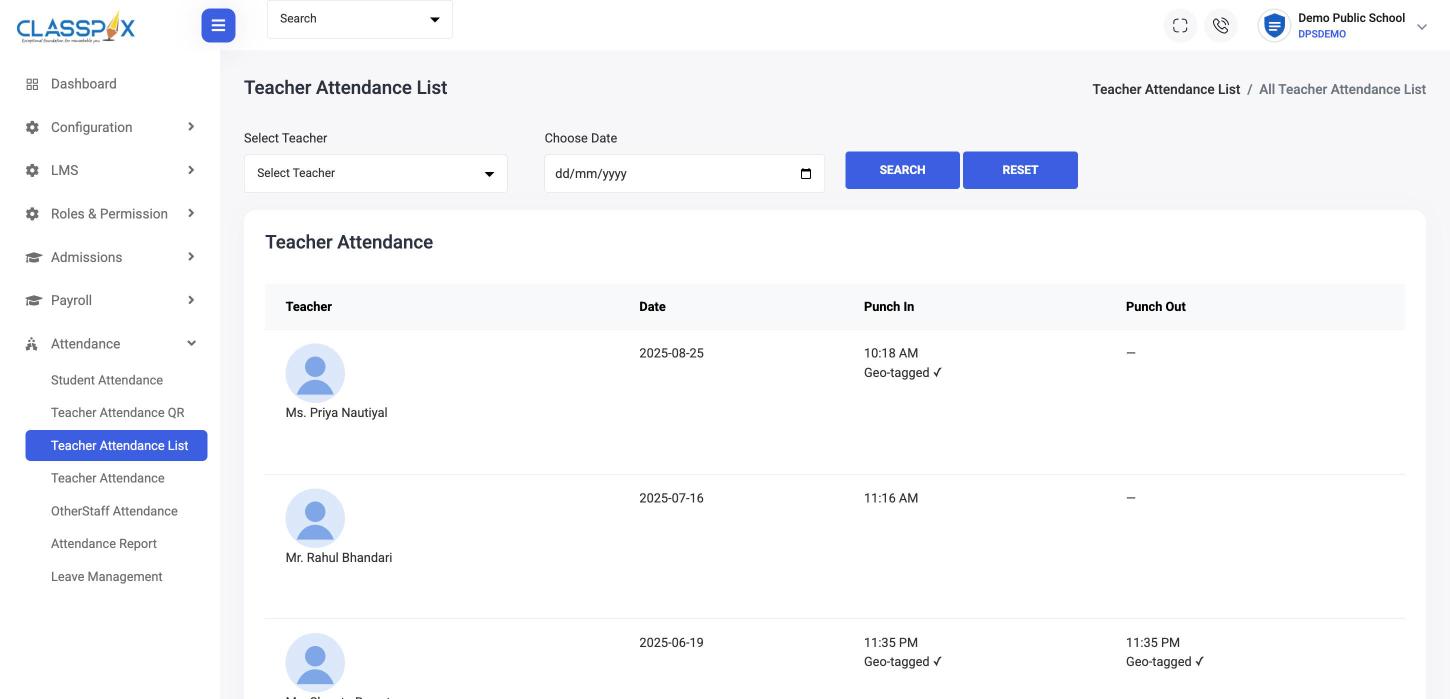
Teacher attendance with punch-in time and location check — ClassPLX school management software screen
Teacher punch-in by QRGeo-tagged punch in and out
Teacher attendance with punch-in time and location check

Why schools stop using paper registers

Registers copied into Excel

Every month, by hand.

Staff attendance on trust

A signature in a register says nothing about when someone arrived.

Leave notes on paper

Parents send notes, teachers lose them.

How attendance works in ClassPLX

1

Student attendance, class by class

For each class and section: total strength, present, absent and on leave, for any date.
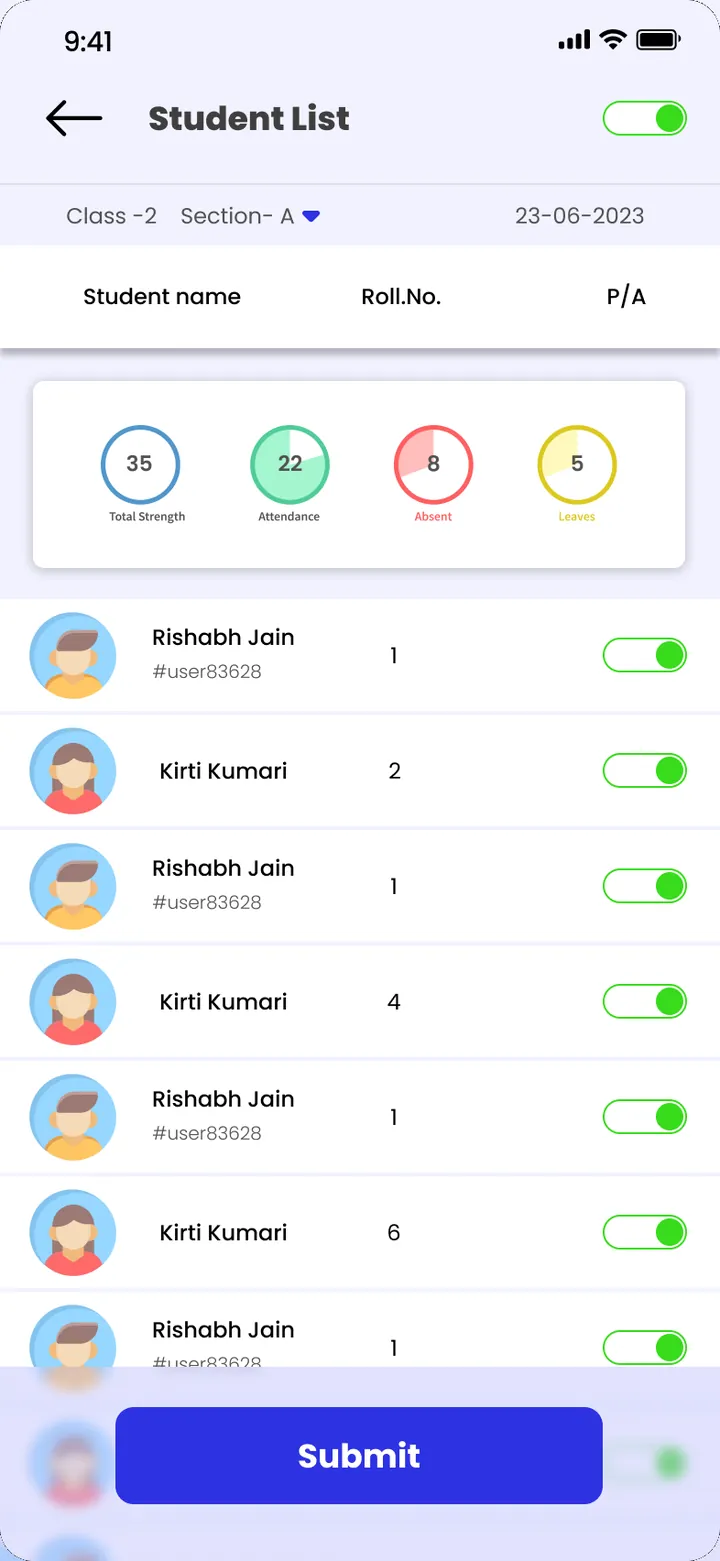
Student attendance · ClassPLX app screens, sample data. Tap to try.
2

Teachers punch in with a QR code

The school generates an attendance QR for a date range. Teachers scan it; punch-in and punch-out are recorded with time and location.

3

Leave requests with approvals

Students' and teachers' leave with dates, plus remarks from the parent, the teacher and the school.
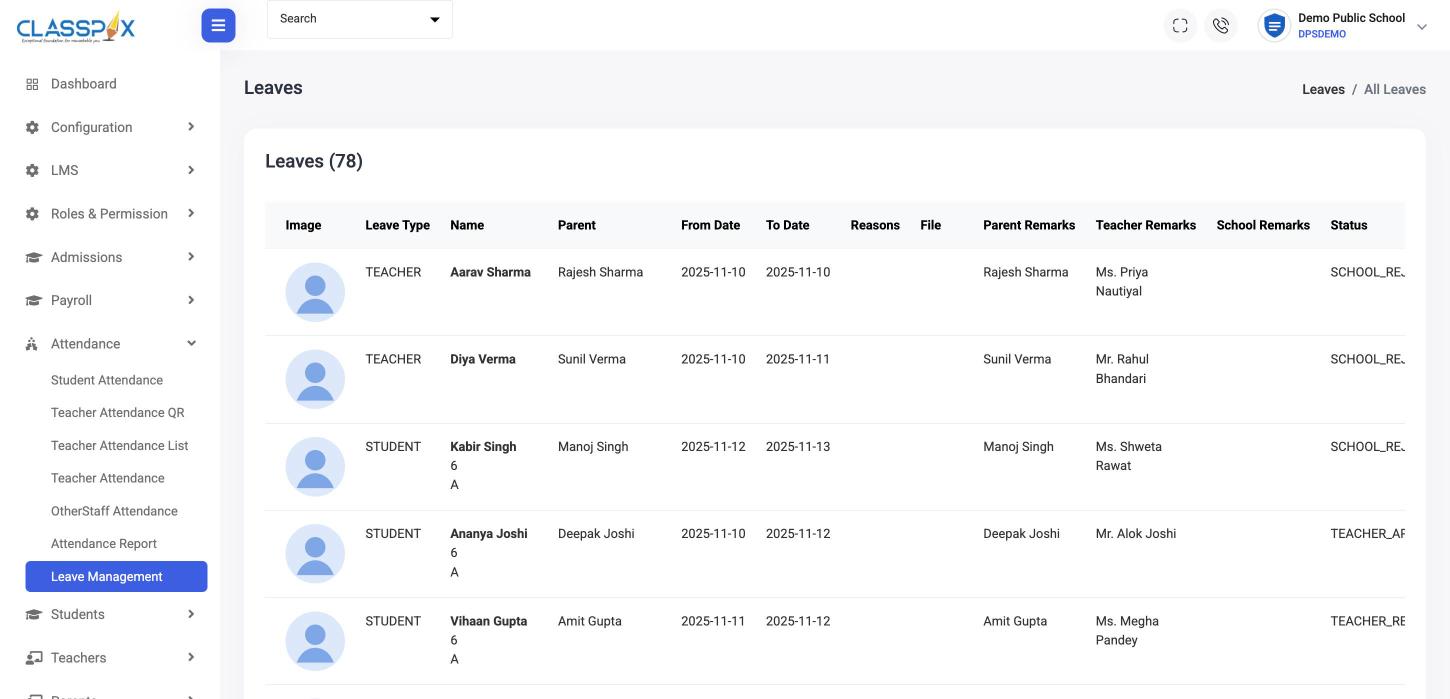
Leave requests with approvals — ClassPLX screen
Student and teacher leaveParent, teacher and school remarks
Leave management
4

Monthly reports, exported

Student attendance by year, month, class and section; teacher and other-staff attendance by month. Export in one click.

What you get

  • Student attendance by class and section
  • Teacher attendance by QR
  • Geo-tagged punch in and punch out
  • Other-staff attendance
  • Leave management with approvals

Attendance reports

  • Student attendance by month, class and section
  • Teacher attendance by month
  • Other-staff attendance by month

On the dashboard

The attendance chart on the admin dashboard shows the last seven days.

What principals say

  • All work become very fast ,automated and become very easy to manage online records, track student and teacher attendance, pending dues of fee with high efficiency and accuracy

    Neelam RawatPrincipal, Blossom Academy

In their own words, from our client feedback form.

Guide

School attendance management system: a complete guide

Attendance is taken every day, for every class and every staff member. Small delays add up across a year. This is how ClassPLX handles student and staff attendance from the first period to the monthly report.

Student attendance, class by class

The class teacher opens the class and section for the day and marks each student present, absent or on leave. The summary at the top shows total strength, present, absent and leave counts as they mark, so mistakes are easy to spot before submitting. Attendance can be looked up for any past date, which helps when a parent asks about a particular day.

Because attendance reads from the same student record as fees and exams, a new admission or a transferred student is already correct in the class list. Teachers never maintain their own copy of the roll.

Teacher attendance with QR and location

Staff attendance in a paper register only proves that someone signed. In ClassPLX the school generates an attendance QR code for a date range. Teachers scan it when they arrive and when they leave, and the punch-in and punch-out are saved with the time and a geo-tag of where the scan happened. The principal sees who came in, at what time, from the same screen. Other staff, such as office, transport and support staff, are tracked separately so their reports stay clean.

Leave requests and approvals

Students' and teachers' leave requests are recorded with dates and remarks from the parent, the teacher and the school, and each request has a clear status. A leave note that would have been lost in a school bag now sits against the student record, and approved leave shows correctly in the attendance count instead of an unexplained absence.

Monthly attendance reports

  • Student attendance by year, month, class and section.
  • Teacher attendance by month.
  • Other-staff attendance by month.
  • Export any report to Excel in one click.

The admin dashboard shows an attendance chart for the last seven days, so a dip in a class or a pattern of late arrivals is visible without opening a report. Monthly staff attendance also gives the accounts team a clean basis for the salary run in payroll.

What parents see

Parents see their child's attendance in the ClassPLX app, with present and absent days on a calendar. They do not have to wait for a PTM to learn that a child has missed several days.

Why it matters for a school

An attendance management system saves teacher time every morning, removes the monthly copying of registers into Excel, and gives the principal a reliable record for staff punctuality, board requirements and parent conversations. Blossom Academy's principal describes attendance tracking alongside fee dues as one of the biggest changes after moving to ClassPLX.

Getting started

Your class lists and staff records are loaded during onboarding, the attendance QR is set up for your campus, and teachers are trained to mark attendance on the web or in the app. You can try it for a month first with a hands-on demo.

Attendance management system: FAQ

How do teachers mark their own attendance?

By scanning the school's attendance QR code. Punch-in and punch-out are saved with the time and the location.

Can we track staff other than teachers?

Yes. Other-staff attendance is recorded and reported separately.

Can parents apply for a child's leave?

Leave requests carry parent remarks, teacher remarks and school remarks, with a status for each request.

Can we export monthly attendance?

Yes. Pick the year and month (and class and section for students) and export.

Does teacher QR attendance record location?

Yes. Each punch-in and punch-out is saved with the time and a geo-tag of where the QR was scanned.

Can we see attendance for a past date?

Yes. Student attendance can be viewed for any date, by class and section.

Can attendance reports be exported?

Yes. Student, teacher and other-staff attendance reports export to Excel.

See student and teacher attendance in a demo.

A 30-minute walkthrough of ClassPLX on a call or at your school.

Get Price on WhatsApp
30 minutes · No obligation · Hindi or English