


Fee management software

School fee management software

Set the fee structure once, collect fees with receipts, and see pending dues class by class the same day, without opening a register.

Get Price on WhatsApp
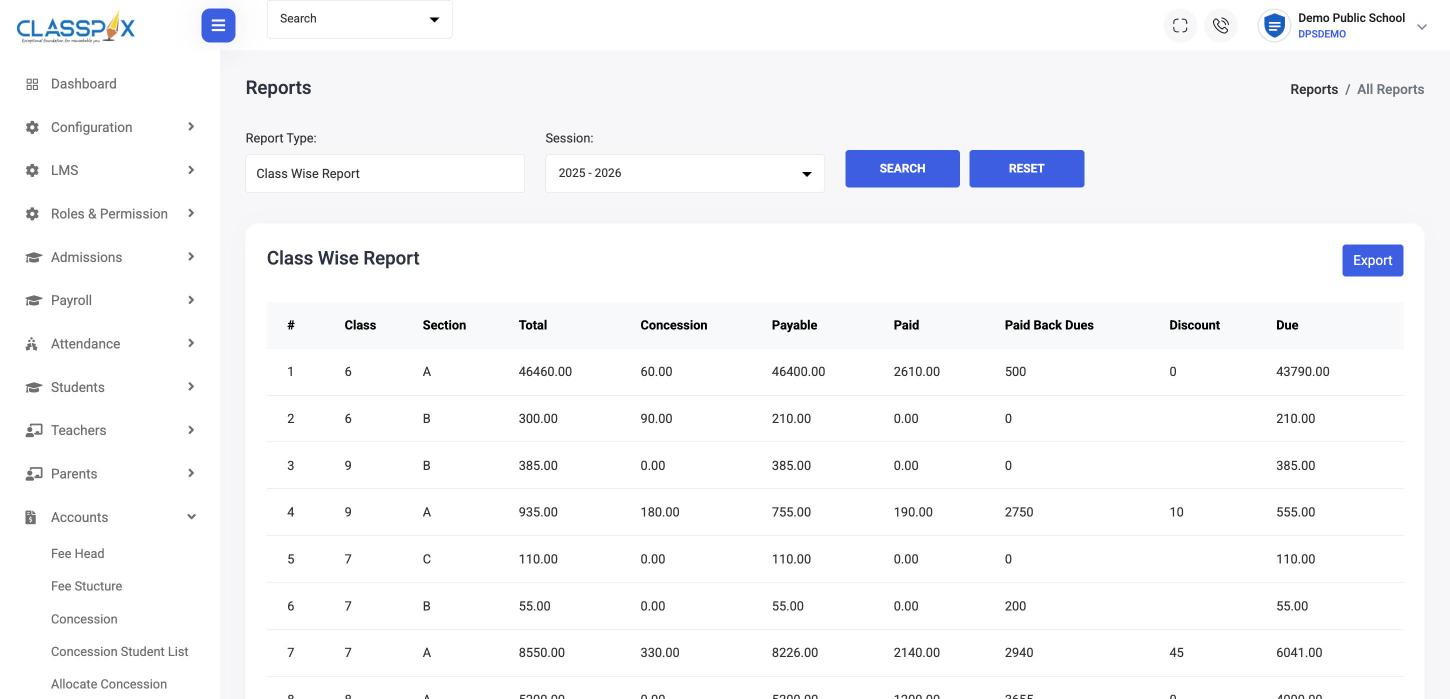
Class-wise fee report: payable, paid and due — ClassPLX school management software screen
Class-wise dues in one clickConcessions and discounts trackedExport to Excel
Class-wise fee report: payable, paid and due

Why schools change their fee system

Dues discovered at month-end

Nobody knows the pending fee for a class until someone totals the register.

Receipts written by hand

Receipt books, carbon copies and a separate cash book that never match.

Parents calling to ask what they owe

The office looks it up by hand, every time.

How fee collection works in ClassPLX

1

Set the fee structure once

Fee heads such as tuition, transport and sports, with an amount per class for the session.
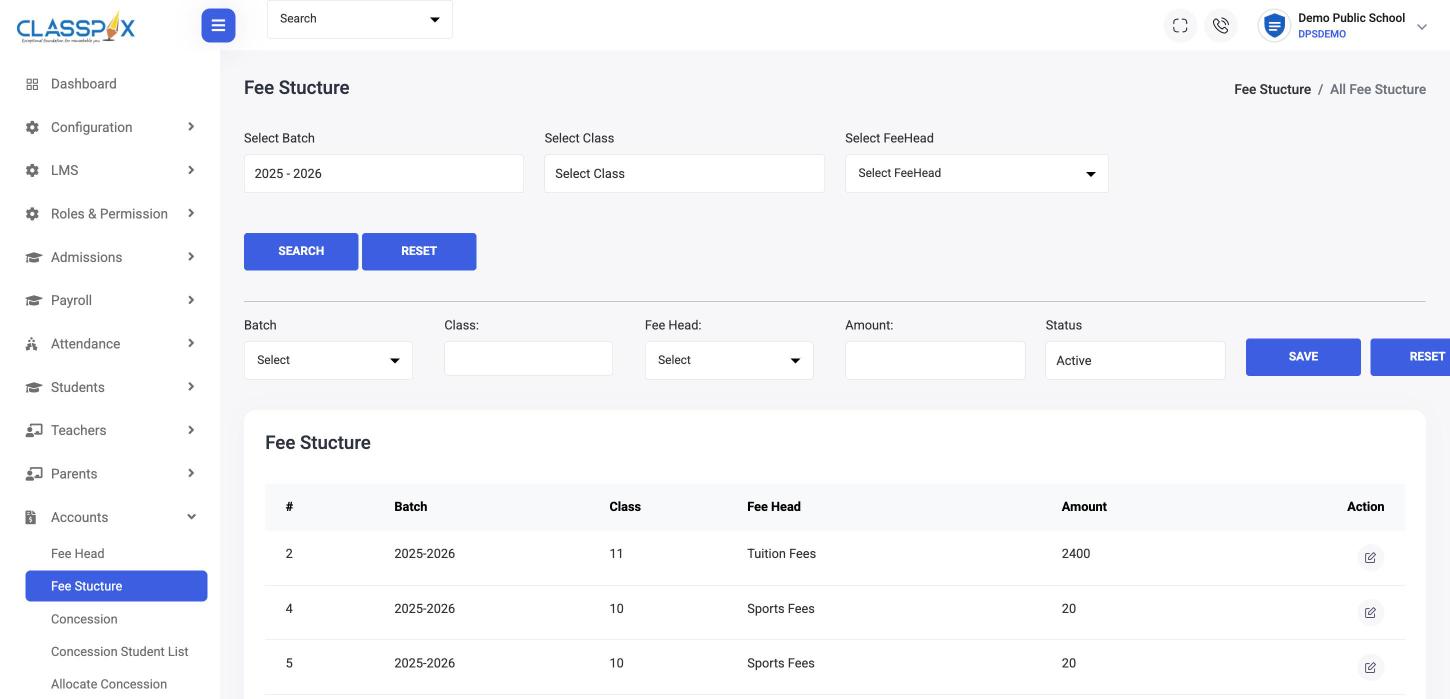
Set the fee structure once — ClassPLX screen
Fee heads per classSet once per session
Fee structure
2

Give concessions where they apply

Create concessions and allocate them to students; discounts and fines are recorded too.

3

Collect, invoice, receipt

Generate invoices, take the payment, print the payment slip. Cheque payments are logged.

4

See dues by class, today

Class-wise, fee head-wise, balance and due reports for the session, exportable to Excel.

For parents

Dues and payment, on the parent's phone.

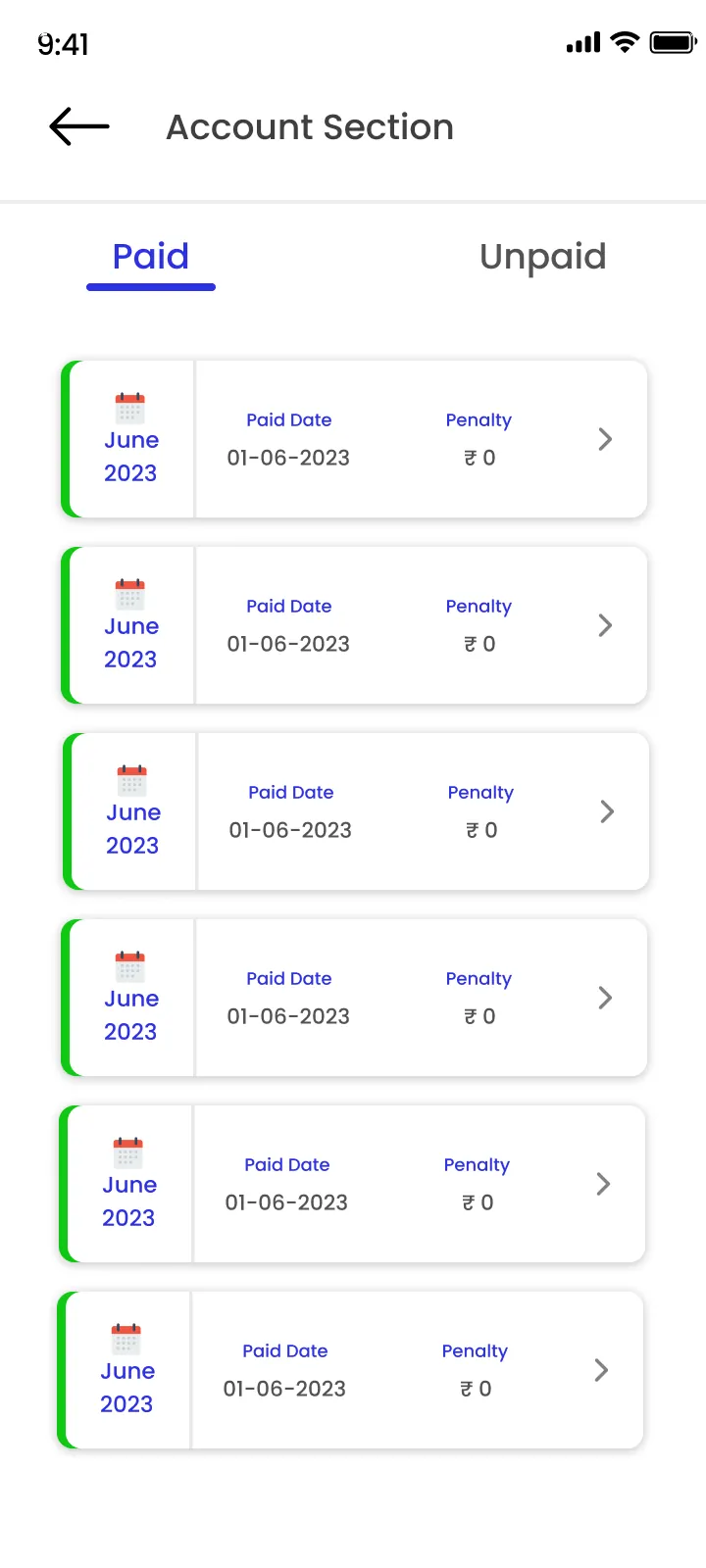
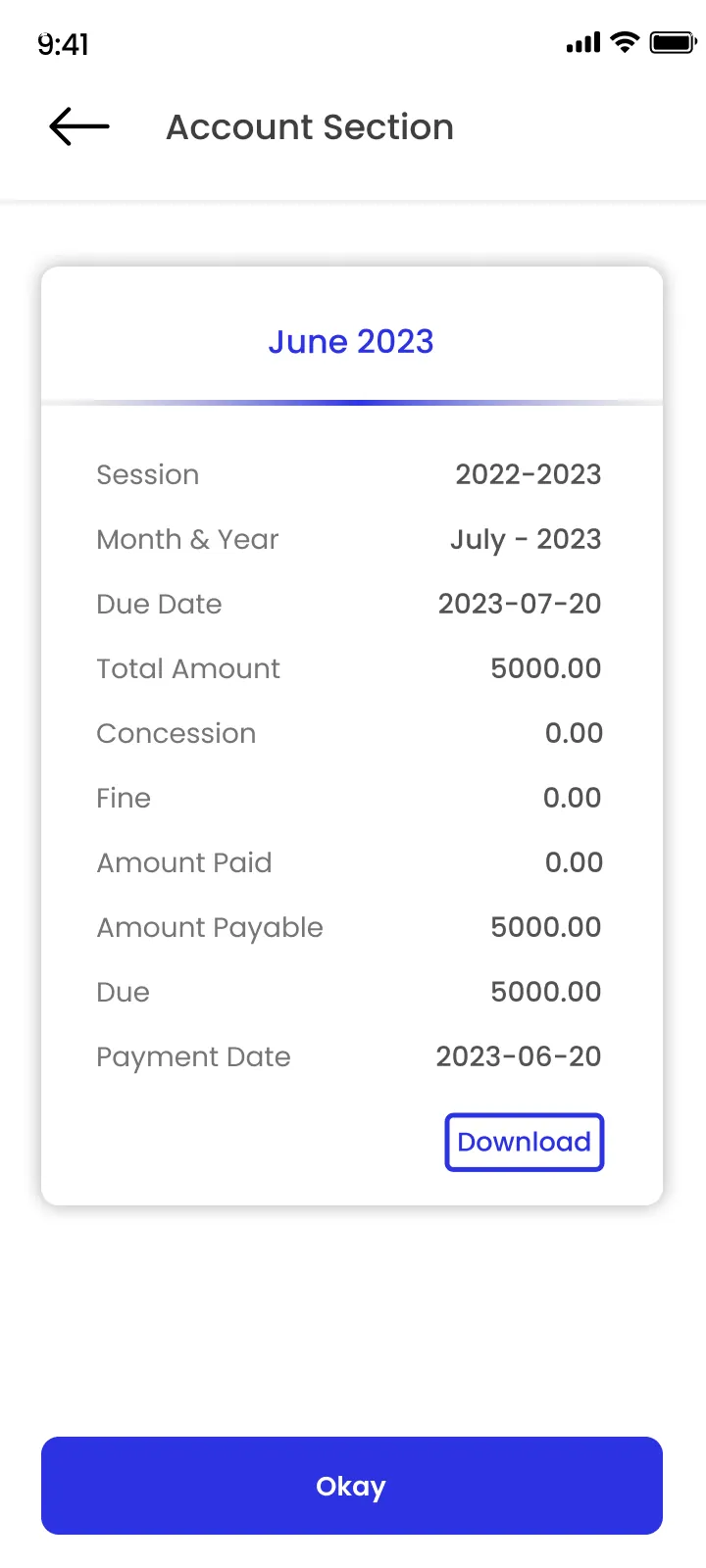
Parents see dues and pay fees online from the ClassPLX app.
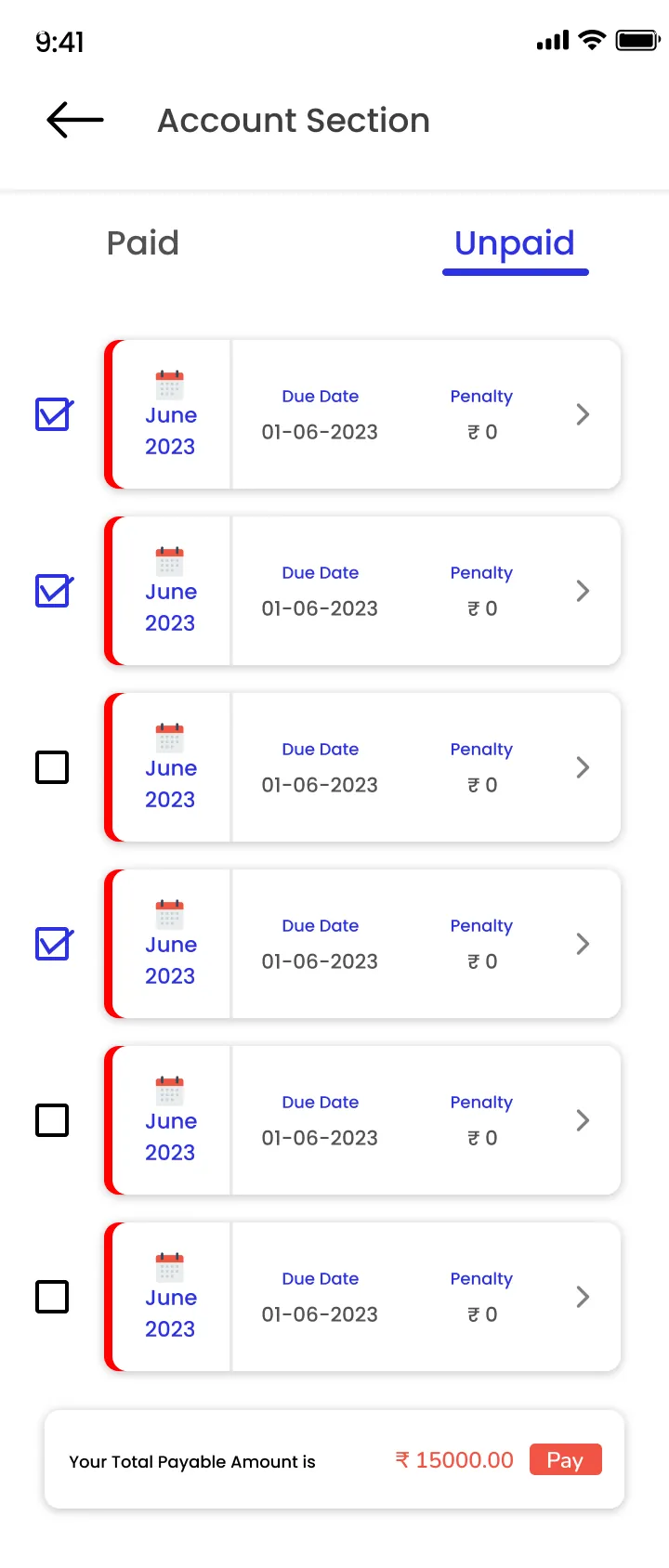
Parent app · Fees · ClassPLX app screens, sample data. Tap to try.

What you get

  • Fee heads and fee structure per class
  • Concessions, discounts and fines
  • Invoices and student-wise invoices
  • Payment slips and dues slips
  • Back dues carried forward
  • Cheque logs and transactions

Fee reports

  • Class-wise report
  • Single class report
  • Fee head-wise report
  • Fee balance report
  • Due report

For parents

Parents see dues and pay fees online from the ClassPLX app.

Schools on fee collection

  • After Samatva built our system, fee records became easier to manage, more organized, and less time-consuming. We can now maintain and track fee details efficiently with better accuracy and transparency.

    Rajendra KandpalPrincipal, Tagore Public School
  • After Samatwa was implemented, our system became more organized and easy to manage. Fee collection and record management have become faster and easier.

    RadhikaPrincipal, S D Green Field School Tanda Badli

In their own words, from our client feedback form.

Guide

School fee management software: how it works in practice

Fees are the part of school administration where small mistakes cost real money. Here is how ClassPLX handles a full session of fee work, from setting the structure in April to the last due report in March.

Why registers and Excel stop working

Many schools keep fees in a receipt book, a cash register and one or two Excel sheets. Each works on its own, but they never agree. A concession given at admission sits in one file, the transport fee in another, and the pending dues for a class only become clear when someone adds up the register at month-end. Parents call the office to ask what they owe, and the answer depends on who picks up the phone.

School fee management software solves this by keeping one fee record per student, linked to the same student profile used for attendance, exams and transport. When the cashier collects a payment, the receipt, the dues list and the class-wise report all change at once.

Setting up fees for a session

At the start of a session the accounts team sets fee heads, such as tuition, admission, transport, sports, computer or exam fee, and the amount for each class. This is done once. When a student is admitted or promoted, the fee structure for that class applies automatically, so nobody types amounts student by student.

Concessions are created once and allocated to the students who get them: sibling concession, staff ward, merit or any rule your school follows. Discounts and late fines are recorded against the fee, so the amount a parent owes is always the amount after concession and before fine, with both visible.

Collecting fees at the counter

  • Search the student, see every pending head and month, and take the payment.
  • Print a payment slip or invoice at once; student-wise invoices are kept for later.
  • Cheque payments go into a cheque log, so a bounced or pending cheque is not lost.
  • Back dues from the previous session carry forward instead of being rewritten.
  • Dues slips can be printed for any class to send home with students.

Online fee payment for parents

With online fee collection, parents see their child's dues in the ClassPLX app and pay from their phone. The payment shows in the same records as counter payments, so the office does not reconcile two lists. Online fee collection is part of the ClassPLX Plus plan; see the pricing page for what each plan includes.

Fee reports the owner can read

Every report is for a session and exports to Excel:

  • Class-wise report: payable, paid and due for each class.
  • Single class report: every student in one class with their balance.
  • Fee head-wise report: how much came in as tuition, transport and so on.
  • Fee balance report: what is still outstanding, student by student.
  • Due report: who to follow up with this week.

The chairman or principal can open these without asking the office, and every receipt and edit is recorded in the audit trail, so a disputed payment can be traced to who entered it and when.

What changes for a school

Schools that move fees into ClassPLX usually notice three things first: the pending amount for each class is known the same day, receipts and records match without a monthly tally, and parents stop calling to ask what they owe. That is what Tagore Public School and S D Green Field School describe in the feedback above.

Moving your existing fee data

You do not start from zero. Our onboarding team takes your current registers or Excel files, sets up fee heads and concessions, loads opening balances and back dues, and trains the accounts staff before go-live. A one-month hands-on demo is available so your team can try it with your own data first.

School fee management software: FAQ

Can parents pay school fees online?

Yes, from the ClassPLX app. Receipts and dues update the same day.

Can we set different fees for different students?

The fee structure is set per class; concessions, discounts and fines then adjust it for individual students.

Can we carry forward last year's dues?

Yes. Back dues are kept per student and appear in the dues list and dues slip.

Can we export fee reports to Excel?

Yes. Fee reports and transactions have an export option.

Can we set different fees for each class?

Yes. Fee heads are created once and each class gets its own amount for the session. A student’s fee follows their class automatically.

Do previous dues carry over to the new session?

Yes. Back dues carry forward to the next session and appear in the student’s dues and in the reports.

Can we track cheque payments?

Yes. Cheque payments are recorded in a cheque log with the payment, so pending or returned cheques can be followed up.

Is online fee payment included in every plan?

Online fee collection is part of ClassPLX Plus. Counter collection, receipts, concessions and all fee reports are in both plans.
See fee collection with your own fee structure.

A 30-minute walkthrough of ClassPLX on a call or at your school.

Get Price on WhatsApp
30 minutes · No obligation · Hindi or English