School operations software · Pillar 2 of 7

School operations management software

Admissions, staff roles, leave, inventory, transport and transfer certificates handled in the same system as fees and attendance, without paper registers.

Get Price on WhatsApp
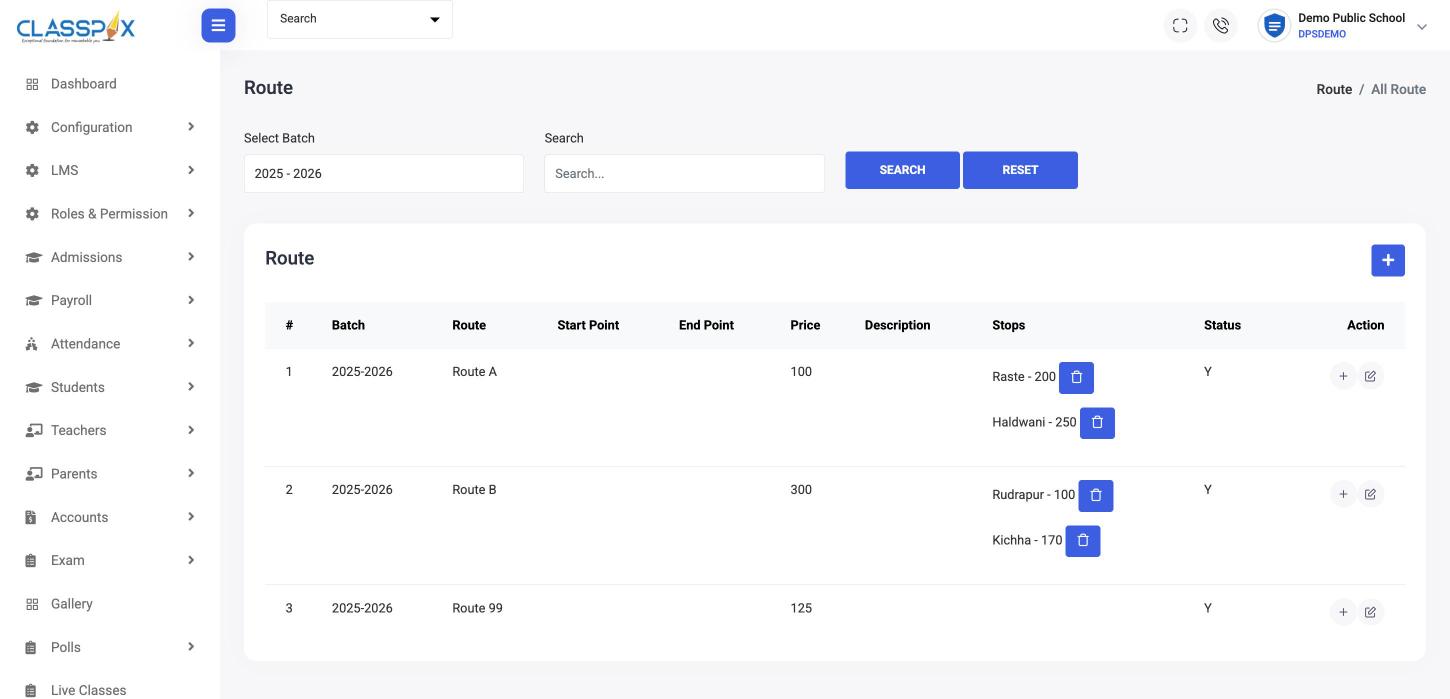
Transport routes with stop-wise fees — ClassPLX school management software screen
Routes with stop-wise feesAllocate transport per student
Transport routes with stop-wise fees

Operations modules in ClassPLX

Admissions

Admission enquiry to admission

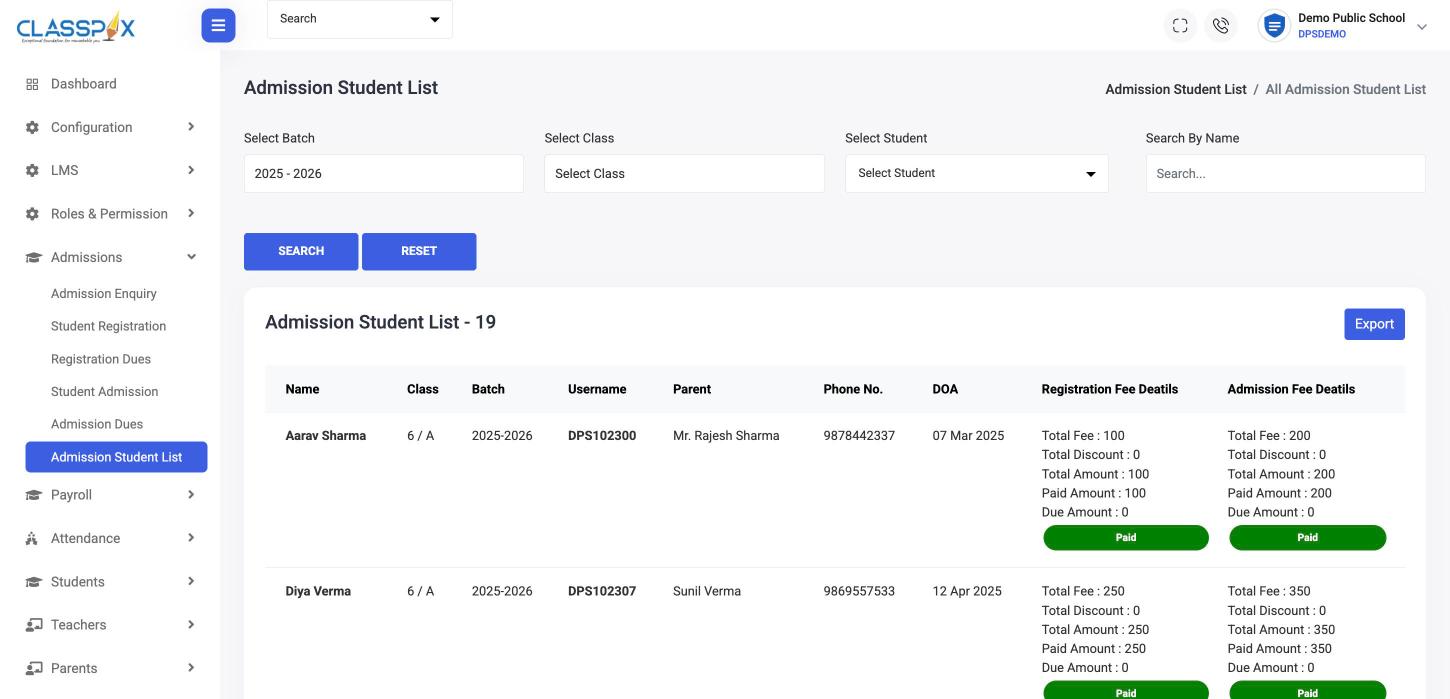
Enquiry, registration, admission and the dues at each step, in one flow. The admitted student lands straight in fees and attendance.

  • Admission enquiries with follow-up remarks
  • Registration and registration dues
  • Admission and admission dues
  • Admission student list with export
Admission management software →
Admission enquiry to admission — ClassPLX screen
Registration and admission fee statusPaid or due, per studentExport the list
Admission student list
Roles

Roles and permissions

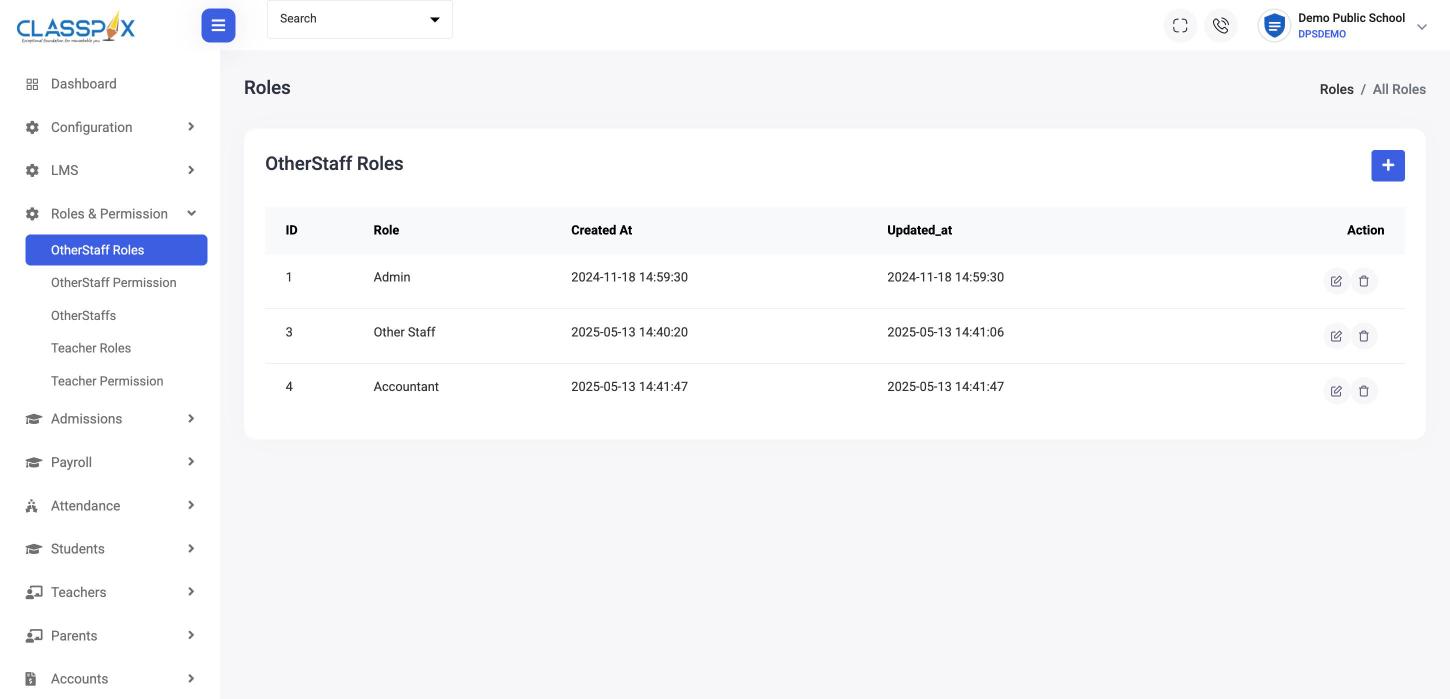
Separate roles and permissions for teachers and for office staff, so each person sees only the screens their job needs.

  • Teacher roles and permissions
  • Office staff roles and permissions
  • Staff list in one place
Roles and permissions — ClassPLX screen
Custom roles for office staffPermissions set per role
Roles
Leave

Leave management

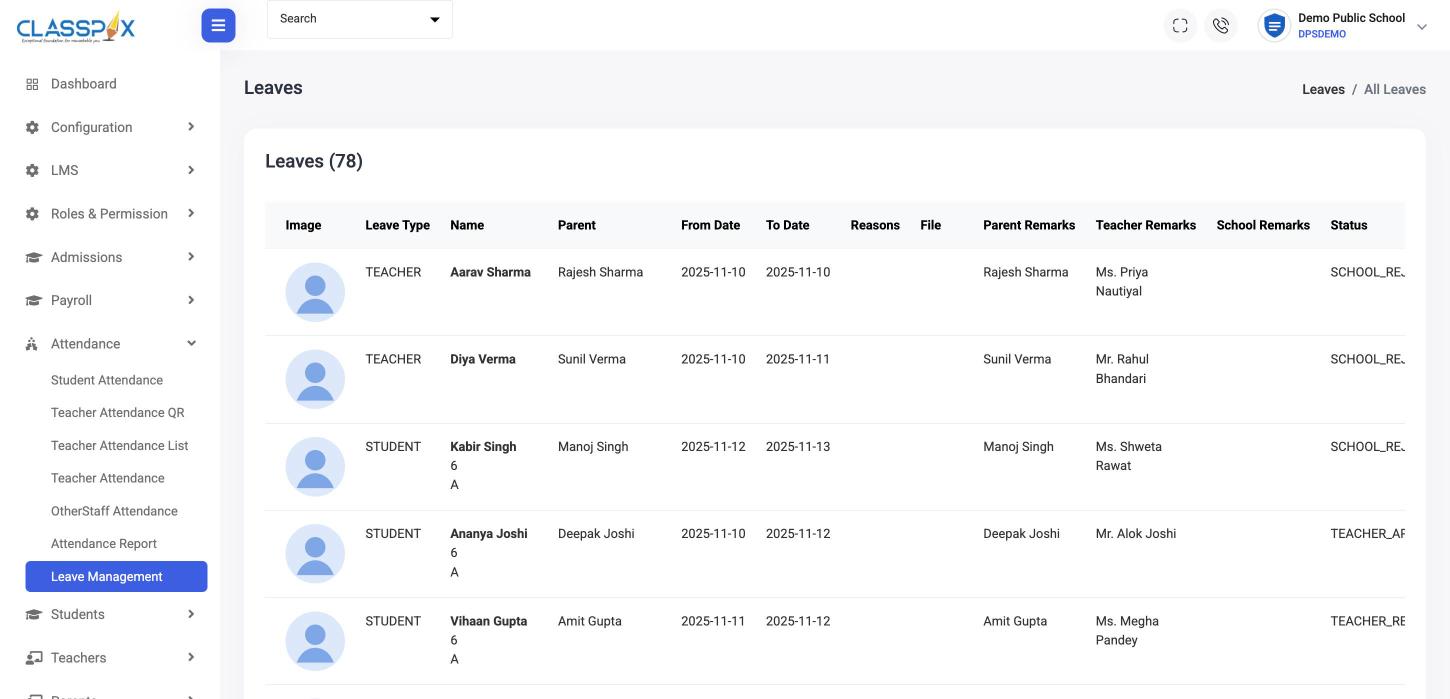
Student and teacher leave requests with dates, with remarks from the parent, the teacher and the school, and a clear status.

Leave management — ClassPLX screen
Student and teacher leaveParent, teacher and school remarks
Leave management
Inventory

Inventory management

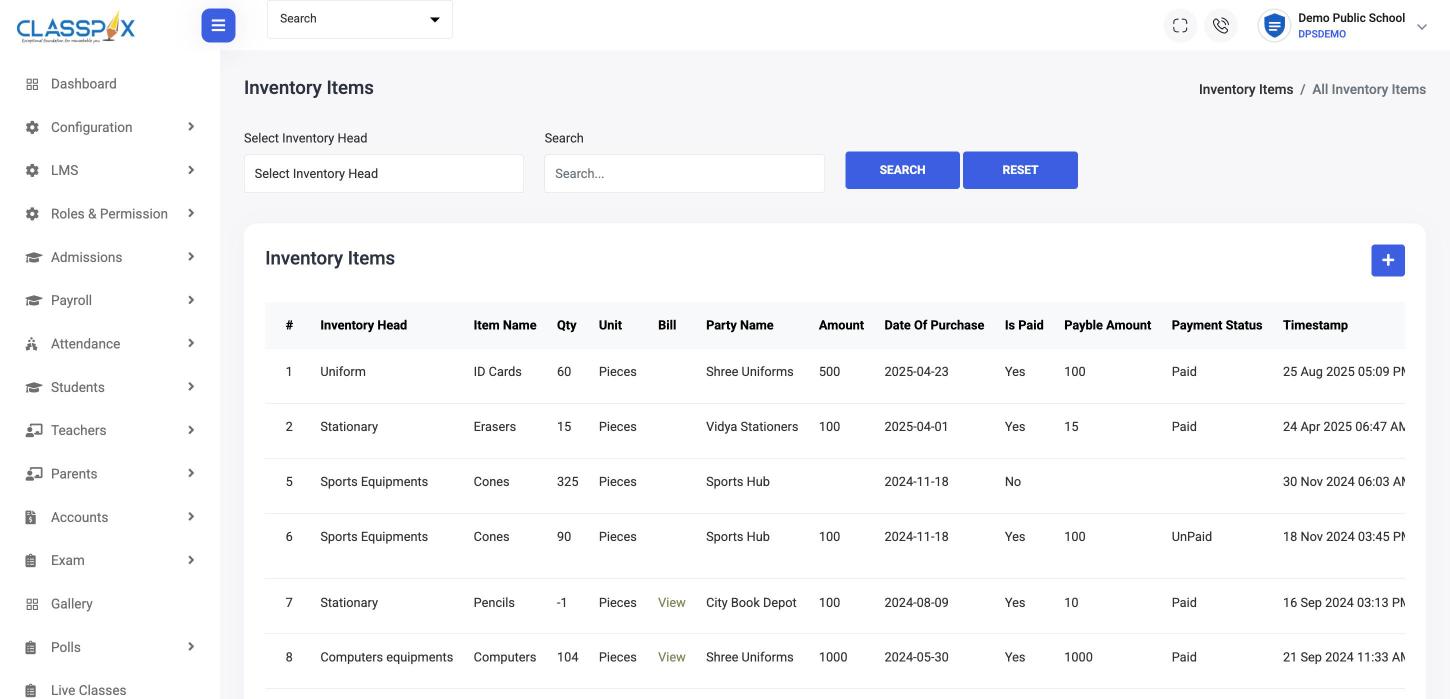
Uniforms, stationery, sports and computer equipment by inventory head, unit and item. Allocate items, take returns and see what is paid.

  • Inventory heads, units and items
  • Allocate and return items
  • Purchase amount and payment status
Inventory management — ClassPLX screen
Stock by head, item and unitPaid and unpaid purchases
Inventory items
Transport

School transport management

Routes with start and end points, stops with their own fee, drivers, and transport allocated to each student.

Certificates

Transfer certificates

Generate a TC and keep the list of students who have taken one, by batch and class.

Transfer certificates — ClassPLX screen
Transfer certificates on recordBatch, class and parent on one row
TC students

Who uses it

  • Office staff — enquiries, admissions, TCs, transport and stores.
  • Principal — leave approvals and who can open what.
  • Admin — roles and permissions for every staff member.

Guide

School operations management: running the office without registers

Operations is everything that keeps a school running outside the classroom: admissions, staff access, leave, stores, buses and certificates. Each one usually has its own register. ClassPLX puts them on the same records as fees and attendance.

Admissions

Enquiry, registration and admission run as one flow, with the fee and dues at each step. An admitted student goes straight into fees, attendance and exams. More on admission management.

Roles and permissions

Teachers and office staff get separate roles, each with its own permissions. The accountant sees fee screens, the receptionist sees enquiries, a teacher sees their classes. Nobody shares the admin password. More on security and access.

Leave management

Student and teacher leave requests carry dates and remarks from the parent, the teacher and the school, with a clear status. Approved leave shows correctly in attendance.

Inventory

Uniforms, stationery, sports and computer equipment are kept by inventory head, unit and item. Items are allocated and returned against a record, and purchase amounts show as paid or unpaid. The store no longer depends on one person's notebook.

Transport

Routes have start and end points and stops, each stop with its own fee. Drivers are recorded against routes, and transport is allocated to each student, so the transport fee joins the student's dues automatically.

Transfer certificates

TCs are generated from the student record, and the TC list keeps batch, class and parent on one row for later reference.

Why it matters

  • One student record across admissions, transport, stores and fees.
  • Each staff member sees only what their job needs.
  • The principal can approve leave and see who has access to what without paperwork.
  • Reports export to Excel when management needs them.

Visitor management and gate pass are part of ClassPLX Plus; admissions, inventory, TCs and session transfer are in both plans. See pricing.

School operations: FAQ

Can we track admission enquiries before a student registers?

Yes. Admission enquiries are recorded with the student, parents, class sought and follow-up remarks, then moved to registration and admission.

Does ClassPLX manage school transport?

Yes. Routes, stops with stop-wise fees, drivers and transport allocation per student.

Can we issue transfer certificates?

Yes. Generate a TC from the student record and keep a list of all TC students.

Can I see it with my own school's data?

Yes. Book a free demo and we set it up with your classes and fee structure, on a call or at your school.

Can each stop on a bus route have a different fee?

Yes. Each stop on a route has its own fee, and the transport fee joins the student’s dues.

Can we track uniform and stationery stock?

Yes. Inventory is kept by head, unit and item, with allocation, returns and purchase payment status.

See admissions, transport and stores run from one screen.

A 30-minute walkthrough of ClassPLX on a call or at your school.

Get Price on WhatsApp
30 minutes · No obligation · Hindi or English